Knowledge Base · Troubleshooting
Troubleshooting Guide: HWID Devices, TikTok, Telegram, Torrents & Crashes
Verified fixes for common issues: managing HWID devices, BitTorrent policy, watching TikTok on iOS, local SOCKS5 proxy for Telegram, and Windows/macOS OS permissions.
-
Step
HWID Device Limit Reached — How to Unlink Old Devices
Each subscription is bound to hardware device IDs (HWID).
• How to remove old devices: Open this documentation inside@OutlineKeysRobotin Telegram — the "Your Subscriptions" panel at the top of the page lists all connected devices. Tap✕next to any device or click "Reset All".
• For Shadowrocket & Throne: Make sureSend HWIDis enabled in subscription settings.
• Need more devices? Add extra device slots in the bot for 50 RUB / device. -
Step
Subscription Disabled Due to BitTorrent (P2P Policy)
BitTorrent (P2P) traffic is strictly prohibited on our servers.
Progressive auto-suspension schedule:
• 1st warning — 5 minutes
• 2nd warning — 30 minutes
• 3rd warning — 2 hours
• 4th+ warning — 24 hours.
Close torrent clients (qBittorrent, uTorrent), P2P game launchers (Lesta, War Thunder, VK Play), and P2P movie apps (Stremio, Zona) before connecting. -
Step
How to Watch Fresh TikTok on iOS & Android
In Happ go to
Settings → Dev → Enable "Tunnel all connections via VPN", then scroll to the bottom of your server list, select Fast Poland, and restart TikTok. -
Step
Telegram Connection & Local SOCKS5 Proxy
Connect to Poland or Netherlands via VPN, or enable
Settings → Allow LAN connections → SOCKS5inside Happ and enter the local SOCKS5 address in Telegram Proxy Settings. -
Step
iOS App Crashes (No Limit Mode & Xray-TUN)
In Happ, enable "No Limit mode" in settings to bypass iOS Network Extension RAM limits. In INCY, enable
Settings → Tunnel → Use Xray-TUNandPing Settings → TCP Ping. -
Step
Windows Firewall & macOS Gatekeeper Fixes
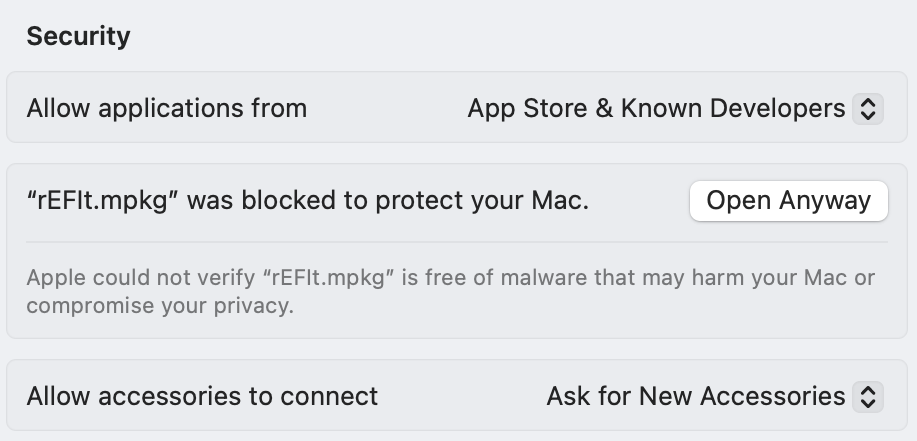
On Windows, if TUN mode has no internet, disable Windows Defender Firewall and run the client as Administrator. On macOS, allow unsigned DMG apps via
System Settings → Privacy & Security → Open Anyway.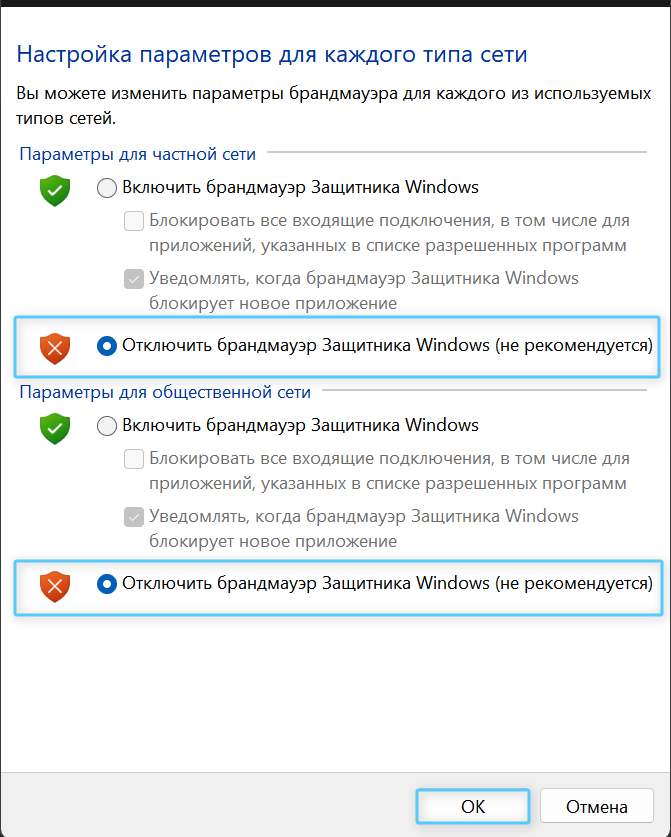
Need Help?
Ask our instant AI Assistant trained on all @OutlineKeysRobot manuals, open the bot to manage your keys, or message our support team.