Troubleshooting · Desktop TUN & Firewall
What to Do If Internet Stops Working After Connecting VPN on Windows or macOS
If your desktop VPN client shows Connected in TUN mode but no websites load, check Administrator permissions and Windows Defender Firewall.
-
Step
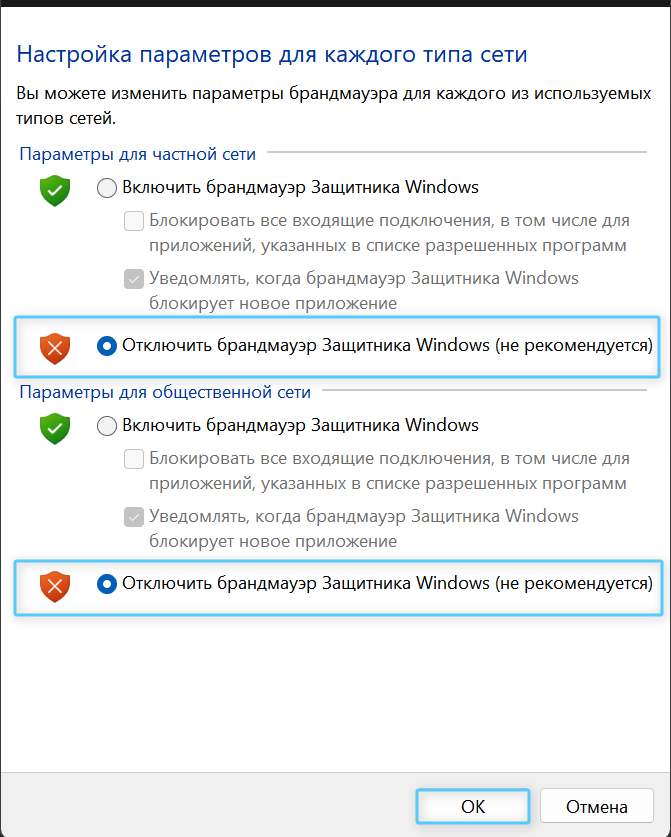
Windows 10 / 11 Fix: Run as Administrator & Check Defender Firewall
Close the VPN client completely, disable Windows Defender Firewall for private and public networks, and relaunch Happ / FlClashX / Throne as Administrator.
-
Step
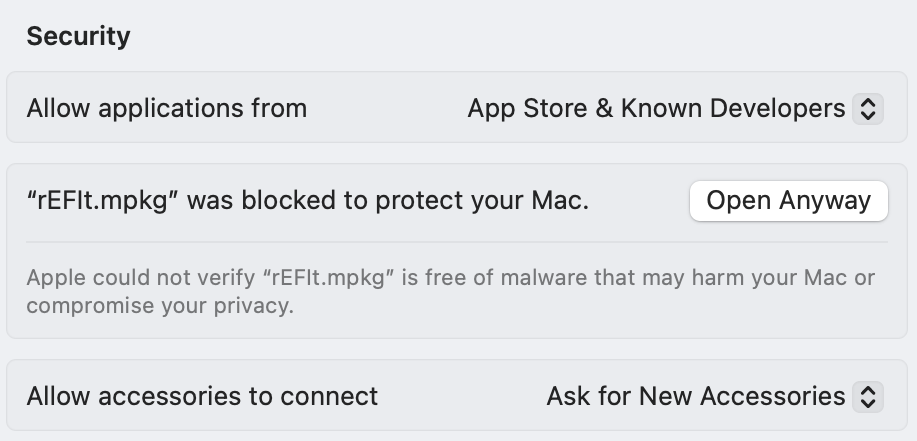
macOS Fix: Allow in Privacy & Security (Gatekeeper)
Go to System Settings → Privacy & Security, scroll down, and click "Open Anyway" next to the VPN app.
Other Troubleshooting Articles
How to add steam.exe, cs2.exe, deadlock.exe & remote desktop apps to direct bypass in Happ & INCY
How to select the OutlineKeysRobot 4 JSON routing rule and update Happ (Xray >= 26.7.8)
Split tunneling setup across Happ, INCY, Shadowrocket, and Throne
Connecting to White Russian (Ultra Hysteria2, xHTTP, gRPC) & enabling tlshello fragmentation
How to connect Telegram to Happ local SOCKS5 port 10808 for reliable UDP calls
1-click HWID reset, enabling Send HWID in Shadowrocket/Throne, and changing your subscription URL
How automatic P2P protection works and which apps seed P2P traffic in the background
No Limit mode in Happ, Xray-TUN in INCY, and recommended tvOS clients
Using the "Support" (🎧) → "+ New Ticket" tab inside @ookvpn and copying your HWID device list
Troubleshooting & Support
Browse our step-by-step troubleshooting articles below, ask our online assistant, or contact a live operator inside the @ookvpn Mini App ("Support" 🎧 → "+ New Ticket").