Troubleshooting · Contacting OOKVPN Support
How to Open a Support Ticket Inside the OOKVPN Bot App & Copy Your Diagnostic Info
Technical support for OOKVPN is provided directly inside the @ookvpn (@OutlineKeysRobot) Telegram Mini App under the "Support" (Поддержка) tab.
-
Step
Step 1. Copy Your Ready HWID & Subscription Summary
Tap the floating "💬 Need Help?" button in the bottom-right corner of this page, choose "👨💻 Call Operator", and tap "📋 Copy Info for Operator" (it automatically includes your Telegram ID, key URL, and bound HWID devices/OS).
-
Step
Step 2. Open the "Support" (🎧) Tab Inside @ookvpn and Tap "+ New Ticket"
Open the
@ookvpnMini App in Telegram, switch to the "Support" (Поддержка 🎧) tab in the bottom bar (or tap "Help" on your key card), tap "+ New Ticket" (+ Новое обращение), paste the copied summary, and attach a screenshot.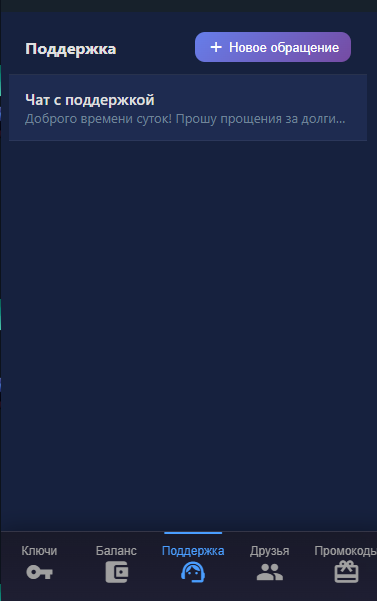
Other Troubleshooting Articles
How to add steam.exe, cs2.exe, deadlock.exe & remote desktop apps to direct bypass in Happ & INCY
How to select the OutlineKeysRobot 4 JSON routing rule and update Happ (Xray >= 26.7.8)
Split tunneling setup across Happ, INCY, Shadowrocket, and Throne
Connecting to White Russian (Ultra Hysteria2, xHTTP, gRPC) & enabling tlshello fragmentation
How to connect Telegram to Happ local SOCKS5 port 10808 for reliable UDP calls
1-click HWID reset, enabling Send HWID in Shadowrocket/Throne, and changing your subscription URL
How automatic P2P protection works and which apps seed P2P traffic in the background
No Limit mode in Happ, Xray-TUN in INCY, and recommended tvOS clients
Unblocking the virtual TUN adapter in Windows Defender Firewall and allowing apps in macOS Gatekeeper
Troubleshooting & Support
Browse our step-by-step troubleshooting articles below, ask our online assistant, or contact a live operator inside the @ookvpn Mini App ("Support" 🎧 → "+ New Ticket").