Troubleshooting · Games & Per-App Proxy
How to Fix Steam, CS2, Deadlock & Online Games with VPN: Per-App Proxy Exclusions in Happ & INCY
When TUN mode is active, all system traffic routes through the VPN server, which can cause matchmaking errors or high ping in CS2, Deadlock, Dota 2, and Steam. Fix this in 1 minute by adding these apps to Per-App Proxy exclusions in Happ or INCY.
-
Step
Step 1. Disconnect VPN Before Editing the App List
In Happ (Windows / Android) and INCY (Android), per-app proxy rules are applied when the TUN adapter starts. Turn OFF the VPN connection on the main screen first.
-
Step
Step 2. Enable "Direct Connection for Selected Applications"
1. Open Settings → App Proxy Settings (Настройки прокси для приложений).
2. Select "Direct connection for selected applications" (Прямое подключение для выбранных приложений).
3. Check or add your games and tools:steam.exe,cs2.exe,deadlock.exe,dota2.exe,rfusclient.exe,rutserv.exe.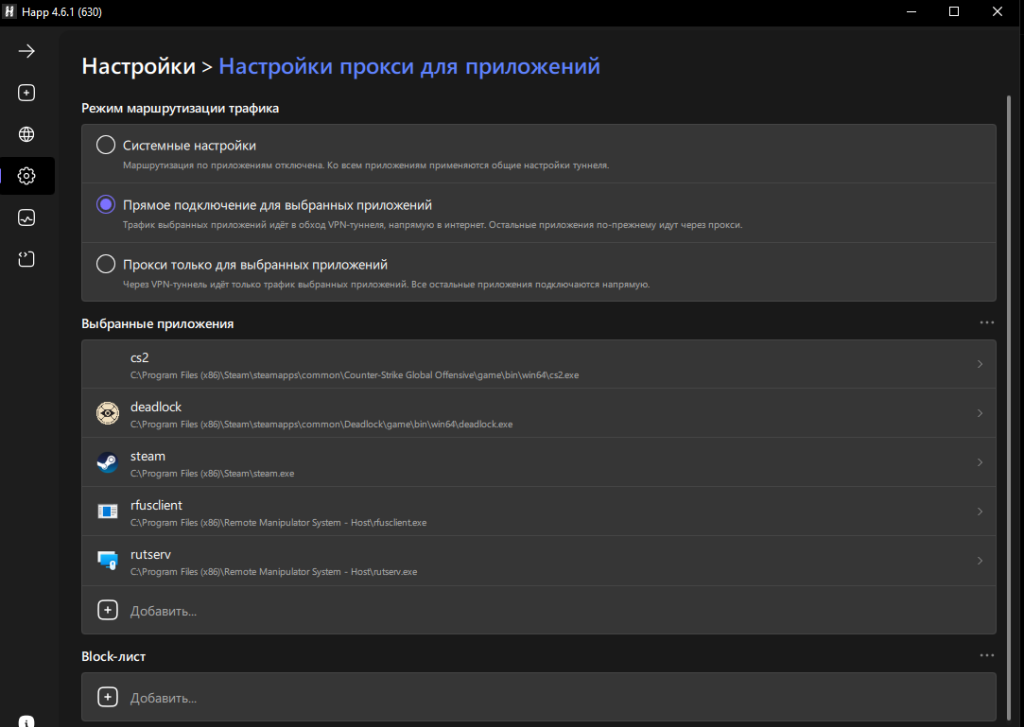
-
Step
Step 3. Reconnect VPN
Return to the home screen and turn VPN back ON. Discord and YouTube will route through VPN while Steam and CS2 connect directly with your native low ping.
Other Troubleshooting Articles
How to select the OutlineKeysRobot 4 JSON routing rule and update Happ (Xray >= 26.7.8)
Split tunneling setup across Happ, INCY, Shadowrocket, and Throne
Connecting to White Russian (Ultra Hysteria2, xHTTP, gRPC) & enabling tlshello fragmentation
How to connect Telegram to Happ local SOCKS5 port 10808 for reliable UDP calls
1-click HWID reset, enabling Send HWID in Shadowrocket/Throne, and changing your subscription URL
How automatic P2P protection works and which apps seed P2P traffic in the background
No Limit mode in Happ, Xray-TUN in INCY, and recommended tvOS clients
Unblocking the virtual TUN adapter in Windows Defender Firewall and allowing apps in macOS Gatekeeper
Using the "Support" (🎧) → "+ New Ticket" tab inside @ookvpn and copying your HWID device list
Troubleshooting & Support
Browse our step-by-step troubleshooting articles below, ask our online assistant, or contact a live operator inside the @ookvpn Mini App ("Support" 🎧 → "+ New Ticket").