Troubleshooting · Xray Routing
How to Fix XrayCore Error / geo-date (geosite) in Happ & INCY
If Happ or INCY shows an XrayCore Error, geo-date, or geosite error when connecting, follow these two steps to switch to the built-in OutlineKeysRobot 4 JSON routing profile and verify your Xray core version.
-
Step
Step 1. Select the "OutlineKeysRobot 4 JSON" Routing Profile
Open Settings → Routing in Happ or INCY, enable Routing, and select the
OutlineKeysRobot 4 JSONprofile that is bundled with your OOKVPN subscription.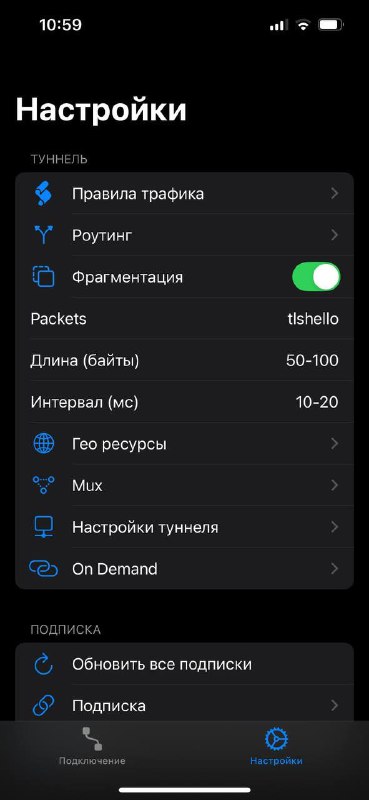
-
Step
Step 2. On iOS: Ensure Global Happ (Xray >= 26.7.8) Is Installed
Check the bottom of Happ Settings to verify that your Xray core version is at least
26.7.8. Replace outdated "Happ Plus" builds with Global Happ (Kazakhstan App Store guide) or use UXWay / Shadowrocket.
Other Troubleshooting Articles
How to add steam.exe, cs2.exe, deadlock.exe & remote desktop apps to direct bypass in Happ & INCY
Split tunneling setup across Happ, INCY, Shadowrocket, and Throne
Connecting to White Russian (Ultra Hysteria2, xHTTP, gRPC) & enabling tlshello fragmentation
How to connect Telegram to Happ local SOCKS5 port 10808 for reliable UDP calls
1-click HWID reset, enabling Send HWID in Shadowrocket/Throne, and changing your subscription URL
How automatic P2P protection works and which apps seed P2P traffic in the background
No Limit mode in Happ, Xray-TUN in INCY, and recommended tvOS clients
Unblocking the virtual TUN adapter in Windows Defender Firewall and allowing apps in macOS Gatekeeper
Using the "Support" (🎧) → "+ New Ticket" tab inside @ookvpn and copying your HWID device list
Troubleshooting & Support
Browse our step-by-step troubleshooting articles below, ask our online assistant, or contact a live operator inside the @ookvpn Mini App ("Support" 🎧 → "+ New Ticket").